
🧭 Olympus Sample Copy Trading Settings
This page gives you example copy trading settings for different styles of trading on Olympus.
These are not magic numbers or one-size-fits-all presets. They are meant to help you start with a setup that matches your risk tolerance, trading pace, and market preference.
Use them as a starting point, then adjust based on your own balance, goals, and experience.
💡 Before You Copy These Settings
A good wallet setup should match:
- your account size
- your risk tolerance
- the type of wallets you follow
- how active or selective you want your bot to be
A setup that works well for a slow macro trader can be terrible for a fast sports or high-frequency wallet.
If you're new, start more conservatively than you think you need.
Olympus may also show a Risk checkpoint before you copy a wallet that looks bot-like or extremely high-frequency. Treat that as a sign to reduce size, tighten filters, and consider Limit Buy Mode before enabling copying.
💡 Do not guess which profile fits. Every setup below is a starting point, not an answer. Open the trader's profile, click Backtesting, and replay these settings against that specific leader's history before you apply them. A profile that suits one wallet can be badly wrong for another, and a backtest tells you which in about a minute. See Backtesting.
💰 Example Assumptions
The examples below assume:
- Account size: around
$10,000 - Max Trade Size: usually around
5%of account value or less - You are using wallet-specific filters
- You may need to adjust these settings upward or downward based on the trader you follow
- Maximum Price Deviation (%) can use your global default or a wallet-specific override
If your balance is much smaller or larger, your settings should usually scale with it.
⚡ Following 5-Minute Crypto Wallets
High-frequency copying of crypto bot wallets that trade Polymarket's 5-minute (and 15-minute) up/down markets.
This style is different enough from the profiles below that it gets its own dedicated guide, including a real example setup. Click below to expand it.
⚡ 5-Minute Crypto Wallet Setup — real example insideClick to expandClick to collapse
Fast crypto bot wallets can place dozens of trades per hour. They can be profitable to copy, but they punish sloppy sizing and loose execution harder than any other wallet type. Before copying one, read the 5 and 15 minute crypto bot wallet guidance and treat your first weeks as an experiment.
Get the ratio right first
Your Ratio % is the single most important setting here, and the rule is simple:
Match the leader's risk, not their dollar size. If the trader is risking
1%of their portfolio per position, your copied position should also be about1%of yours.
The ratio that achieves this is your portfolio value divided by the leader's portfolio value. That is exactly what the Ratio Recalculator (the circular-arrows button next to the Ratio % field) computes for you — click it instead of guessing.
In the example below, the recalculated ratio is 5%, which means this follower's portfolio is about a twentieth the size of the leader's. When the leader risks 1% of their stack on a position, the copied trade lands at roughly 1% of the follower's stack too.
Never reuse a ratio number you saw someone else use. The correct ratio is specific to your balance vs. that leader's balance, and it changes as either one grows or shrinks — recalculate it periodically.
Real example setup
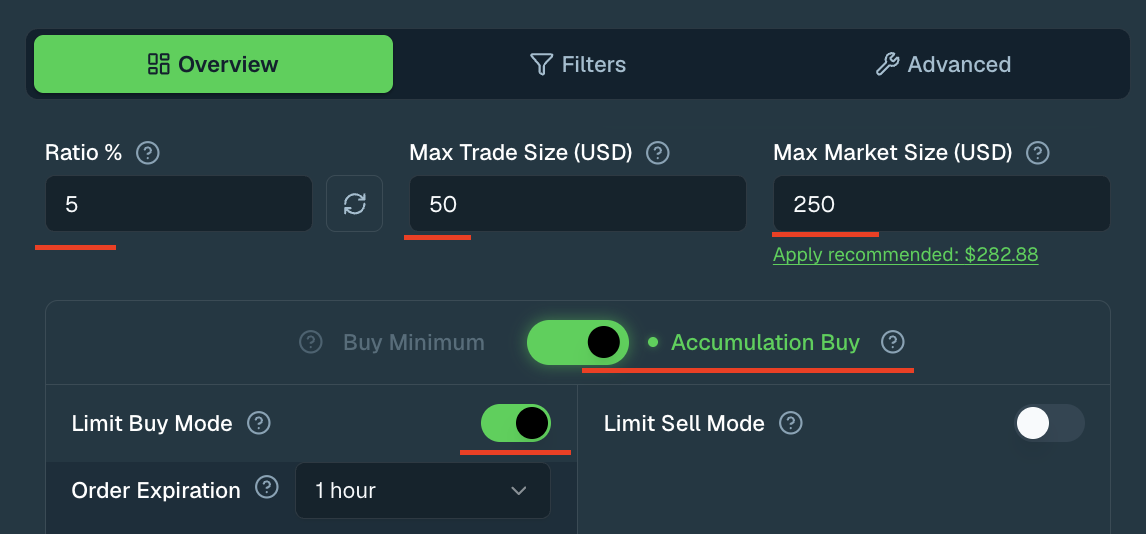
Overview tab: Ratio %, Max Trade Size, Max Market Size, and Accumulation Buy enabled instead of Buy Minimum
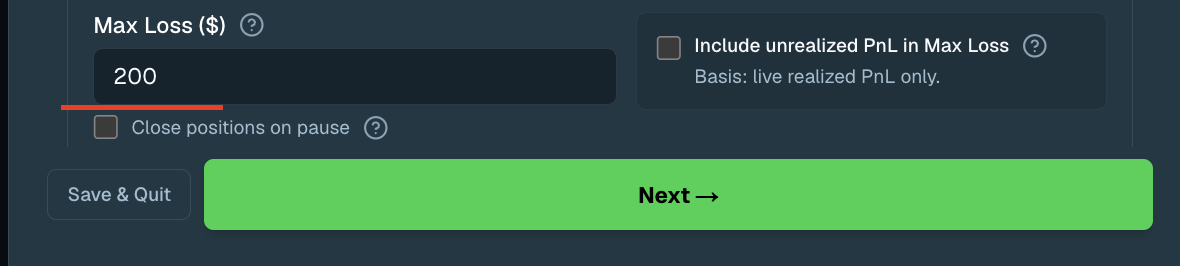
Overview tab continued: Max Loss and PnL basis for the kill switch
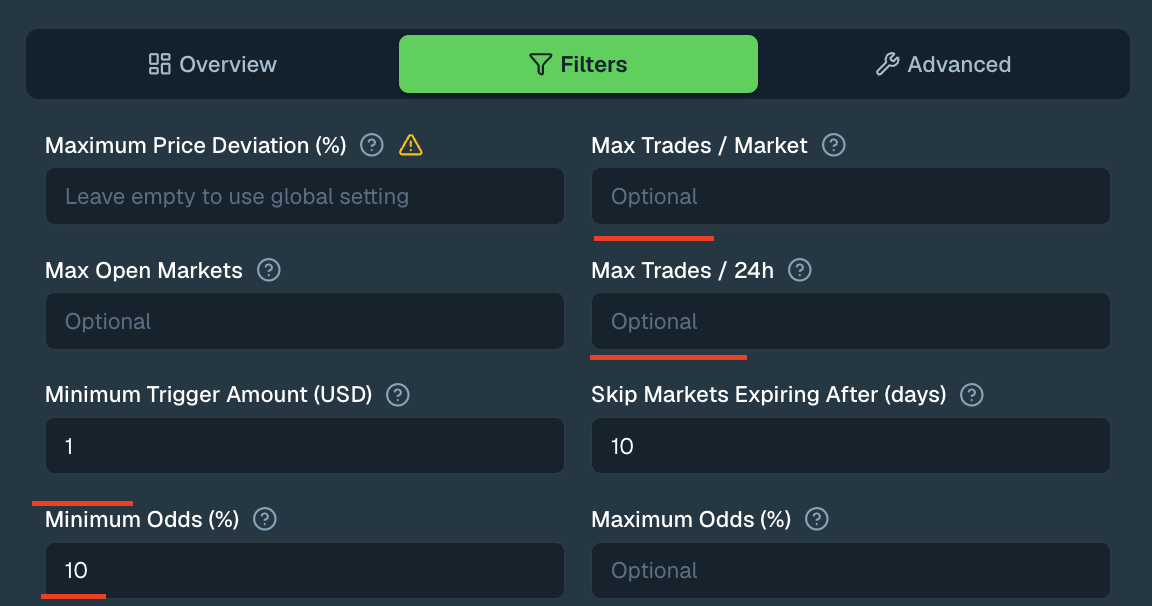
Filters tab: Minimum Trigger Amount and Minimum Odds set for a 5-minute bot wallet
Overview tab:
- Ratio %: set via the Ratio Recalculator (the circular-arrows button next to the field) —
5%here, but yours will differ - Max Trade Size (USD):
$50— keeps any single copied trade modest while testing - Max Market Size (USD):
$250— deliberately tighter than the recommended$282.88shown under the field; you can apply the recommendation later once the wallet proves it copies well - Accumulation Buy: enabled, so tiny eligible copies are batched into fewer, right-sized orders instead of each one being rounded up to the minimum tradable size — 5-minute bots often send hundreds of small clips, and rounding each one up to the minimum is the single most common way followers lose money copying a fast wallet (see the watch-out below)
- Limit Buy Mode: enabled, with Order Expiration at
1 hour— limit entries protect you from spread crossing and taker-fee drag, which compound fast at this trade frequency - Limit Sell Mode / Post-Only: off
- Stop-Loss / Take-Profit: left empty — 5-minute markets resolve too quickly for them to matter much here
- Max Loss ($):
$200— a hard kill switch that pauses copying this wallet once your realized losses on it reach the threshold. Always set this when testing a fast bot; a bot can lose many trades in a row before you notice. Include unrealized PnL in Max Loss and Close positions on pause are both left off, so the kill switch is based on live realized PnL only and won't force-close open positions when it trips
Filters tab:
- Minimum Trigger Amount (USD):
$1— effectively no trigger filter, because bot wallets often split entries into small clips you still want to follow - Skip Markets Expiring After (days):
10— a light backstop in case a longer-dated market ever shows up under the same wallet - Minimum Odds (%):
10— skips extreme long-shots and very late entries below 10¢ - Maximum Price Deviation (%): left on the global default; fast markets move quickly, so an overly tight deviation will skip most entries
- Max Trades / Market and Max Trades / 24h: left open in this example — the small trade size and the Max Loss kill switch do the capping instead. Set them if you want a harder bound on activity
- Liquidity and volume filters are unnecessary here since the wallet only trades one market type
Watch-outs
- Buy Minimum can inflate your effective ratio — this is the #1 way followers lose money on fast wallets. If your intended copy size is
$0.50and it gets rounded up to the minimum on every one of hundreds of daily clips, your real spend can run many times your configured ratio, so you can lose money even in a window where the leader profits. Olympus warns you about this in three places — a bot-speed badge on the wallet in your Wallets and Multi-Wallet tables, an inline warning next to the Buy Minimum / Accumulation Buy toggle, and a risk checkpoint when you first follow a bot-speed wallet — but the fix is always the same: use Accumulation Buy, as in the example above. - Test in isolation. Copy only this wallet at first (a separate Olympus wallet is ideal), compare your copied PnL against the leader's, and only scale up after the results hold.
- Crowded bots copy worse. If a wallet has many copiers, you compete for the same fills — judge it by your own fill quality, not its headline PnL.
🟢 Conservative Macro Trader
Long-hold, lower-frequency copying for political, macro, or slower-moving markets.
Best for: Users who want steadier exposure, fewer trades, and tighter control over position sizing.
Suggested Settings
- Ratio %:
0.5% - Max Trade Size (USD):
$500 - Max Market Size (USD):
$1,000 - Minimum Trigger Amount (USD):
$1,000 - Max Open Markets:
10 - Max Trades / Market:
2 - Skip Markets Expiring After (days):
30-90 - Minimum Odds (%):
15 - Maximum Odds (%):
90 - Maximum Price Deviation (%):
3-5
Limit Buy Mode: Usually optional. It can help with entry quality, but slower-moving wallets often work fine without it.
Why this works: This setup is built to avoid overtrading, ignore noise, and keep sizing controlled in markets where trades tend to be more thesis-driven.
🟡 Event or Sports Trader
Medium-frequency copying for sports, event-driven, or faster-resolving markets.
Best for: Users who want more activity than macro trading, but still want reasonable guardrails.
Suggested Settings
- Ratio %:
0.25% - Max Trade Size (USD):
$500 - Max Market Size (USD):
$1,000-$1,500 - Minimum Trigger Amount (USD):
$2,000 - Max Open Markets:
7 - Max Trades / Market:
3 - Skip Markets Expiring After (days):
7-21 - Minimum Odds (%):
20 - Maximum Odds (%):
85 - Maximum Price Deviation (%):
4-6
Limit Buy Mode: Often worth testing, especially in thinner or fast-moving event markets.
Why this works: This profile gives you more flexibility for active event trading while still limiting churn and avoiding very small or low-quality entries.
🔵 Active Trader
Higher-frequency copying for wallets that enter often, scale in, or trade shorter-term setups.
Best for: More advanced users who understand slippage, missed fills, and execution trade-offs.
Suggested Settings
- Ratio %:
0.1% - Max Trade Size (USD):
$100-$250 - Max Market Size (USD):
$500 - Minimum Trigger Amount (USD):
$500 - Max Open Markets:
5 - Max Trades / Market:
3-5 - Skip Markets Expiring After (days):
1-7 - Minimum Odds (%):
40 - Maximum Odds (%):
65 - Minimum Liquidity (USD):
$10,000+ - Minimum 24h Volume (USD):
$5,000+ - Maximum Price Deviation (%):
5-8
Limit Buy Mode: Often helpful. If you copy active traders without price protection, slippage can add up quickly.
Limit Sell Mode: Use carefully. If you enable it, keep the sell timeout short.
Why this works: This setup is designed to stay selective, reduce slippage risk, and avoid getting dragged into too many weak or noisy markets.
If Olympus flags the wallet as bot-like or shows very high recent trade counts, avoid copying it with aggressive market-style buys until you understand the fill quality. Limit Buy Mode may miss some trades, but it can reduce spread crossing and taker-fee drag.
For fast 5 and 15 minute crypto bot wallets, see the Following 5-Minute Crypto Wallets section above and the 5 and 15 minute crypto bot wallet guidance before sizing up. Those wallets usually need isolated testing, conservative market caps, and stricter execution controls.
🟣 Conviction Trader
Lower-frequency copying for larger directional trades and stronger conviction entries.
Best for: Users who want exposure to bigger thesis trades without letting one wallet dominate the whole account.
Suggested Settings
- Ratio %:
0.3-0.5% - Max Trade Size (USD):
$500 - Max Market Size (USD):
$1,000-$1,500 - Minimum Trigger Amount (USD):
$3,000+ - Max Open Markets:
5 - Max Trades / Market:
1-2 - Minimum Odds (%):
25 - Maximum Odds (%):
75 - Maximum Price Deviation (%):
4-6
Limit Buy Mode: Optional, but useful when you want cleaner entries on larger trades.
Why this works: This profile is meant to participate in strong trades without overexposing your balance to one leader, one market, or one idea.
⚠️ A Few Practical Rules
- Start with a lower Ratio % than feels exciting.
- Always set a Max Market Size (USD).
- Use Maximum Price Deviation (%) to protect against bad fills, but remember that setting it too tight can cause missed entries, especially on market buys.
- Use Minimum Trigger Amount (USD) to filter out tiny leader trades.
- Use Buy at Min only for slower wallets where tiny eligible trades are rare — for any bot-speed wallet (500+ trades/48h), use Accumulation Buy so small copies build into right-sized orders instead of each one being rounded up.
- High-frequency wallets usually need stricter filters than slower wallets.
- If you enable Limit Buy Mode or Limit Sell Mode, expect different fill behavior than standard copying.
- Consider Fallback Limit Order for fast or thin markets where you would rather leave a short-lived order than skip the trade entirely.
- If you want automatic exits, you can layer Stop-Loss / Take-Profit on top of these profiles after your core copy settings are dialed in.
🎯 Final Note
These examples are meant to help you get started faster, not replace judgment.
The best settings depend on the wallet you follow, the market category, and how much execution risk you are willing to accept. Start simple, stay conservative, and adjust over time as you learn how your bot behaves.